
Fix Your Social Previews: Why Open Graph Tags Are Essential for Websites


In today’s digital world, social media plays a crucial role in driving traffic to websites. Whether it’s a blog post, an article, a product page, or a promotional offer, how your content appears when shared on platforms like Facebook, Twitter, LinkedIn, or Pinterest can make or break your engagement rates.
One essential tool that helps you control how your content is displayed on social media is Open Graph tags. In this blog, we’ll explore why Open Graph tags are vital for websites, how they impact your social media strategy, and how to properly implement them to ensure your content looks its best when shared.
What Are Open Graph Tags?
Open Graph tags are snippets of code added to the HTML of a webpage. These tags are used by social media platforms to understand and display a preview of your content when it’s shared. They allow you to control how your content appears, including what title, image, and description are shown, as well as other important elements.
Originally developed by Facebook, Open Graph has since been adopted by other social networks like Twitter, LinkedIn, and Pinterest. By using Open Graph tags, you can customize the social preview of your pages to ensure that they display the most relevant information, even when shared by others.
Why Open Graph Tags Matter for Your Website
1. Control the User Experience on Social Media
When someone shares a link to your website on social media, it’s your opportunity to capture their audience’s attention. Without Open Graph tags, social platforms will pull whatever content they can find—sometimes displaying incorrect images or irrelevant descriptions. This can lead to missed opportunities, as users may not find the post visually appealing or informative enough to click.
By using Open Graph tags, you can control exactly how your content appears, ensuring that your link previews include the most compelling visuals, titles, and descriptions. This gives you a chance to make a positive impression and encourage more people to engage with your content.
2. Improve Click-Through Rates (CTR)
A well-designed social media preview increases the chances that users will click through to your website. Think about it: would you be more likely to click on a link with a generic preview, or one that includes an eye-catching image and a compelling headline?
Open Graph tags allow you to specify an attractive image (ideally with the right dimensions and aspect ratio) and craft a description that resonates with your target audience. This makes your link stand out among others in users’ feeds and improves your click-through rates, ultimately driving more traffic to your site.
3. Enhanced Brand Consistency
Consistency in branding is essential for building trust with your audience. When your website’s content is shared across various social platforms, you want it to align with your branding guidelines. Open Graph tags allow you to customize the title, description, and image to reflect your brand’s tone and identity.
For example, if your website uses a specific image style or color scheme, you can choose an image that complements this aesthetic. The title and description can also be adjusted to match the voice of your brand, making your content feel cohesive across all channels.
4. Avoiding Social Media Mistakes
Without Open Graph tags, social platforms might pick up the wrong content from your site. For example, Facebook might pull a random image or a generic meta description that doesn’t adequately represent your page. This could lead to users having a poor first impression of your content and ultimately cause them to scroll past it.
By specifying the right Open Graph tags, you avoid these issues and ensure that your page appears exactly as you intend. Whether you’re sharing a product page, blog post, or landing page, you can fine-tune how your content appears on social media.
5. Boost SEO and Social Signals
Although Open Graph tags themselves don’t directly influence search engine rankings, they can indirectly improve your SEO performance by enhancing engagement on social platforms. More clicks, shares, and comments on your content can create positive social signals, which may help your content rank higher in search engines over time.
Since social media platforms are key sources of traffic and user engagement, using Open Graph tags effectively can help you tap into this powerful channel and drive more organic traffic to your site. By improving engagement, you increase the likelihood that your content will be shared and recommended, boosting your overall visibility online.
How to Implement Open Graph Tags on Your Website
Implementing Open Graph tags on your website is relatively simple, and it can be done by adding specific meta tags to the HTML of your pages. Below is an example of how to add Open Graph tags to a webpage:
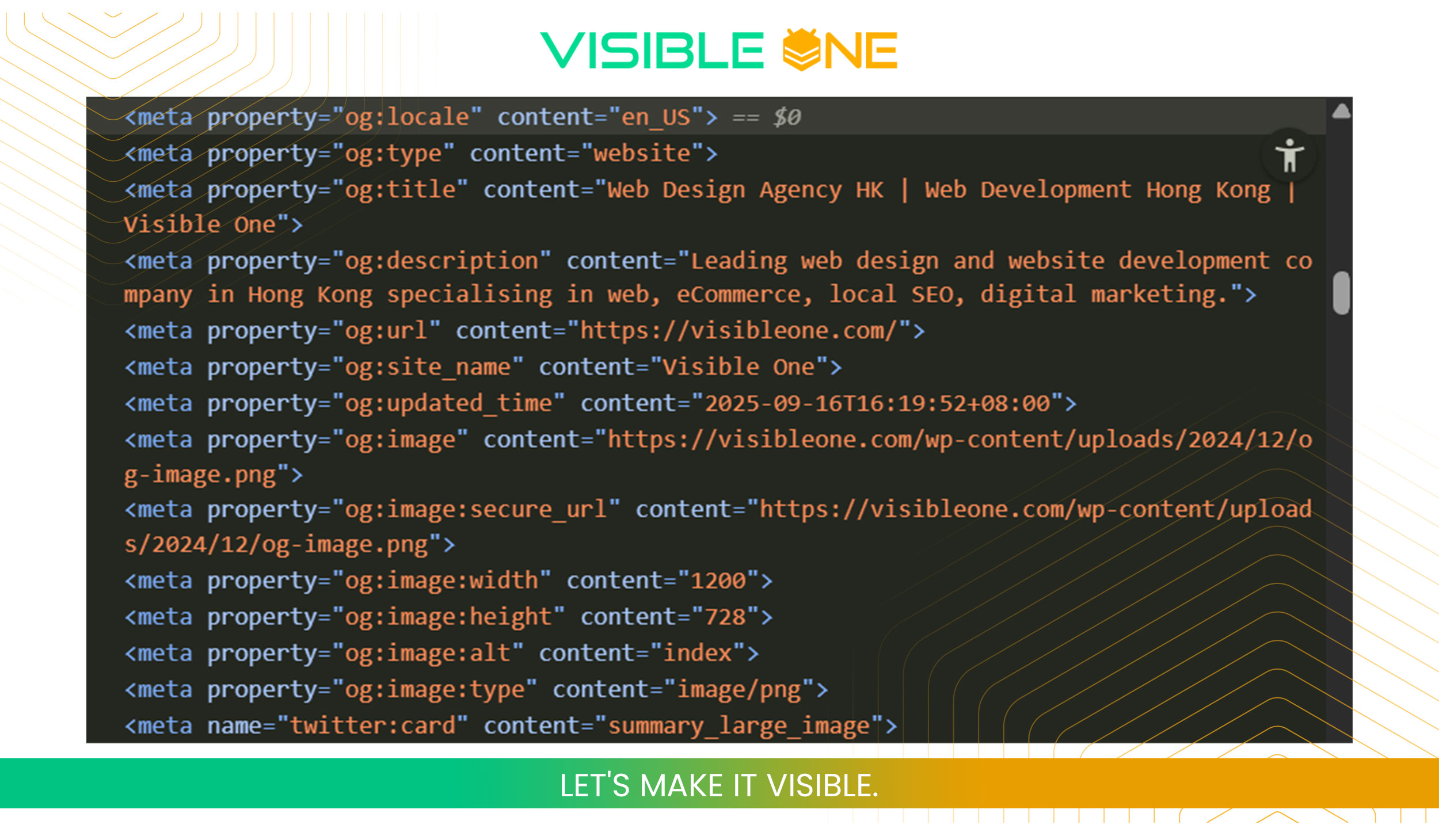
Here’s what each tag does:
- og:title: The title of the page as you want it to appear on social media.
- og:description: A concise and engaging description that will show up below the title.
- og:image: The URL of the image you want displayed when the page is shared.
- og:url: The URL of the page being shared.
- og:type: The type of content (e.g., website, article, video). For most pages, “website” works, but for specific content types like blog posts or articles, you can use “article.”
Best Practices for Open Graph Tags
To make sure your Open Graph tags are as effective as possible, follow these best practices:
1. Choose High-Quality Images
The image you use in your Open Graph tags is one of the most important elements of your social preview. Choose an image that is visually striking and relevant to the content. Ensure that the image is high resolution and the correct size—typically, a 1200 x 630-pixel image works best for most platforms.
2. Keep Titles Concise and Engaging
Your title should be catchy, informative, and concise. Aim for around 60 characters to ensure that your title doesn’t get cut off in previews. This will help your audience understand what the page is about at a glance.
3. Write Compelling Descriptions
Your description should complement the title and give more context about what users can expect if they click the link. Keep it under 150 characters, as social media platforms may truncate longer text. Make sure it’s clear and enticing to encourage engagement.
4. Test Your Open Graph Tags
After implementing Open Graph tags, it’s important to test how your page appears when shared on different social media platforms. Facebook provides a Sharing Debugger tool that lets you check how your Open Graph tags are being read and displayed. Similarly, you can use tools like Twitter Card Validator to test how your content appears on Twitter.
5. Use a Plugin for CMS Sites
If you’re using a content management system (CMS) like WordPress, many plugins (such as Yoast SEO or Rank Math) can automatically generate Open Graph tags for you. These plugins often allow you to customize the Open Graph settings for each page, simplifying the process.
Final Thoughts
Open Graph tags are an essential tool for anyone serious about improving their social media strategy and enhancing the user experience. By controlling how your content appears on social platforms, you can significantly improve engagement, click-through rates, and even SEO performance.
Take the time to properly implement Open Graph tags on your website, and you’ll not only boost your social media presence but also create a seamless experience for users who discover your content online. After all, in the crowded world of social media, first impressions matter more than ever—and Open Graph tags are your key to making a lasting one.